

Introduction
In the financial year 2023-24, managing employee tax forms efficiently is crucial for any organization’s compliance and smooth operations. Form 16 Parts A and B are essential documents that summarize the salary paid to an employee and the taxes deducted during the year. Downloading and preparing these forms in Excel can streamline the process significantly, ensuring accuracy and compliance. In this guide, we’ll walk through the steps to download and prepare Form 16 Part A and B for 50 employees in Excel for the F.Y.2023-24.
Understanding Form 16 Part A and B
Before diving into the process, let’s briefly understand the significance of Form 16 Part A and B. Form 16 Part A contains details of tax deducted at source (TDS) on salary, while Part B provides a comprehensive summary of salary paid, taxes deducted, and other relevant details for filing income tax returns.
Importance of Form 16
Form 16 serves as a certificate issued by employers to their employees, validating the TDS deductions made on their salary income. It acts as a crucial document during income tax filing, providing employees with a consolidated view of their earnings and taxes paid.
Step-by-Step Guide to Download and Prepare Form 16 Part A and B in Excel
Now, let’s delve into the detailed process of downloading and preparing Form 16 Part A and B in Excel for the financial year 2023-24.
1. Accessing the Income Tax Department Portal
To begin, visit the official Income Tax Department portal and log in using your credentials. Navigate to the ‘TDS’ section to access Form 16.
Accessing Form 16 Part A
Click on the ‘Form 16 (Part A)’ option under the ‘Downloads’ section. Enter the required details such as the assessment year and TAN of the employer to generate Part A of Form 16.
2. Generating Part A of Form 16
After entering the necessary details, click on the ‘Generate PDF’ button to download Part A of Form 16. Ensure that all the information is accurate and matches the details of your organization and employees.
Verifying Details in Part A
Before proceeding, carefully verify the details provided in Part A, including the employer’s name, PAN, and TAN, along with the employee’s PAN and other relevant information.
3. Extracting Data for Part B
Once Part A is downloaded and verified, proceed to extract the necessary data for Part B from your payroll software or HRMS system. Compile the information for all 50 employees for the financial year 2023-24.
Organizing Data in Excel
Create a structured Excel sheet with columns for employee details, salary components, tax deductions, and other relevant fields. Ensure consistency and accuracy while entering the data to avoid discrepancies.
4. Integrating Part A and Part B in Excel
Now, it’s time to integrate the information from Part A and Part B into the Excel sheet. Merge the data seamlessly to create a comprehensive Form 16 for each employee.
Using Excel Formulas
Utilize Excel formulas and functions to calculate the total taxable income, deductions, and net tax payable for each employee. Double-check the calculations to ensure accuracy.
5. Formatting and Finalizing Form 16
Once the data integration is complete, focus on formatting the Excel sheet to enhance readability and clarity. Add headers, footers, and appropriate formatting styles to make the document professional.
Reviewing the Document
Before finalizing, review the prepared Form 16 for any errors or discrepancies. Verify the accuracy of all calculations and ensure that the document complies with regulatory requirements.
FAQs (Frequently Asked Questions)
- How often should Form 16 be issued to employees? Form 16 should be issued annually to employees by 15th June of the following financial year.
- Can Form 16 be revised? Yes, employers can revise Form 16 if any errors or discrepancies are identified post-issuance.
- Is Form 16 mandatory for all employees? Form 16 is mandatory for employers to deduct TDS from salary payments. However, it may not be applicable in certain cases, such as when TDS is not deducted or exempted.
- What should I do if there are errors in Form 16? In case of errors in Form 16, notify your employer immediately for rectification and issuance of a revised form.
- Can Form 16 be digitally signed? Yes, Form 16 can be digitally signed by the employer for authenticity and compliance purposes.
- How long should employers retain Form 16 records? Employers are required to retain Form 16 records for a minimum period of 7 years from the end of the relevant assessment year.
Conclusion
Efficiently downloading and preparing Form 16 Part A and B in Excel for the financial year 2023-24 is essential for ensuring compliance with tax regulations and facilitating seamless income tax filing for employees. By following the outlined steps and guidelines, organizations can streamline the process and mitigate potential errors, thereby enhancing operational efficiency and regulatory compliance.
Download the Excel Utility for Automated Preparation of Form 16 Parts A and B in Excel, simplifying the process for managing tax documents. This tool is capable of simultaneously generating Form 16 Parts A and B for up to 50 employees for the fiscal year 2023-24.
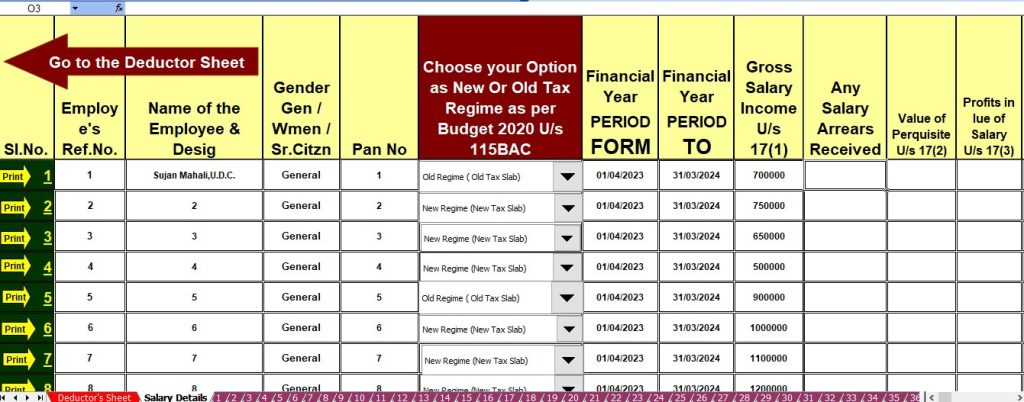

Here are the standout features of this Excel Utility:
- Streamlined Preparation: Easily prepare Form 16 for both Part A and Parts A and B for 50 employees at once for the FY 2023-24.
- Automated Tax Calculation: Automatically calculate Income Tax Liabilities using the latest tax slabs, including both the New and Old Tax Regimes.
- Customizable Salary Structure: Incorporate unique salary structures aligned with the Budget 2023.
- Updated Tax Sections: Includes all amended Income Tax Sections as per Budget 2023-24 modifications, accommodating both New and Old Tax Regimes.
- Data Integrity: Prevent duplication of PAN numbers, ensuring accurate and error-free records.
- Print Ready: Print Form 16 Parts A and B on A4 paper size effortlessly.
- Amounts in Words: Automatically convert numerical amounts into words without the need for complex Excel formulas.
- Versatile Compatibility: Suitable for use by both Government and Non-Government entities.
- User-Friendly Interface: Simply download the Excel file, input employee data, and witness the magic as it prepares Form 16 for all 50 employees seamlessly.
- Compatibility: Compatible with Office 2003, 2007, 2010, and 2011 MS Office versions, ensuring accessibility for all users.

